

May 9, 2023

How Does A Domain Name Work?

written by

Joe Uddeme

Joe Uddeme

How Does A Domain Name Work?

There aren’t many people today who don’t know what a domain name is – but few actually understand how they really work. In this post, NameExperts.com Director Joe Uddeme explains what’s going on behind the scenes.


A domain name is what you type when you want to visit a website. For example, you type “Google.com” into your web browser, and it takes you directly to Google to search for stuff. But a lot happens behind the scenes to ensure the domain name you type takes you to the correct website.

In fact, it’s all pretty complicated – and interesting, too. If you want to buy a premium domain name worth in the tens or even hundreds of thousands, having clear insight into what you’re actually paying for might be a good idea. This article will explain what happens and demystify how the world of URLs and the web works.

Key takeaways:

  1. Understanding the different components of a domain name
  2. Proven ways to buy a domain name
  3. Domain name facts and FAQs

Typewriter with words 'name search' on piece of paper to illustrate article about what makes a domain name


How A Domain Name Leads You To A Website On the Internet

The Internet is an extensive network of computers connected to each other via cables; each computer on this network can communicate with others. Every computer is identified by a unique Internet Protocol (IP) address, which consists of four numbers separated by periods, e.g., 192.168.1.2.
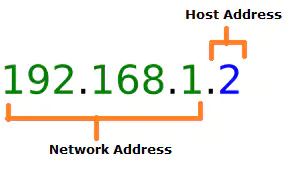
Graphic showing the elements of a domain name

Each website is hosted by a specific computer or server. When you want to visit that website, you need to point to the IP address of the computer hosting it. But IP addresses are difficult to remember. Imagine you had to memorize the unique IP addresses of all the websites you visit; that’ll be impossible, which is why domain names were invented.

A domain name is a human-readable name pointing to a specific IP address on the web. Whenever you type a domain name into your browser, it queries a vast database called the Domain Name System (DNS) and gets the corresponding IP address of the website you want to visit.

The Domain Name System is akin to a phonebook in your home containing your friends’ names and phone numbers. You don’t remember all your friends’ phone numbers; you just need to know their names. Whenever you need a specific number, you check for the name and get it.

This is precisely what the Domain Name System accomplishes; you type a domain, and it gives the correct IP address to your web browser. Your browser fetches the data from the server using that IP address and shows it to you.


Parts Of A Domain Name

domain name has three main parts: top-level domain (TLD), second-level domain, and subdomain.
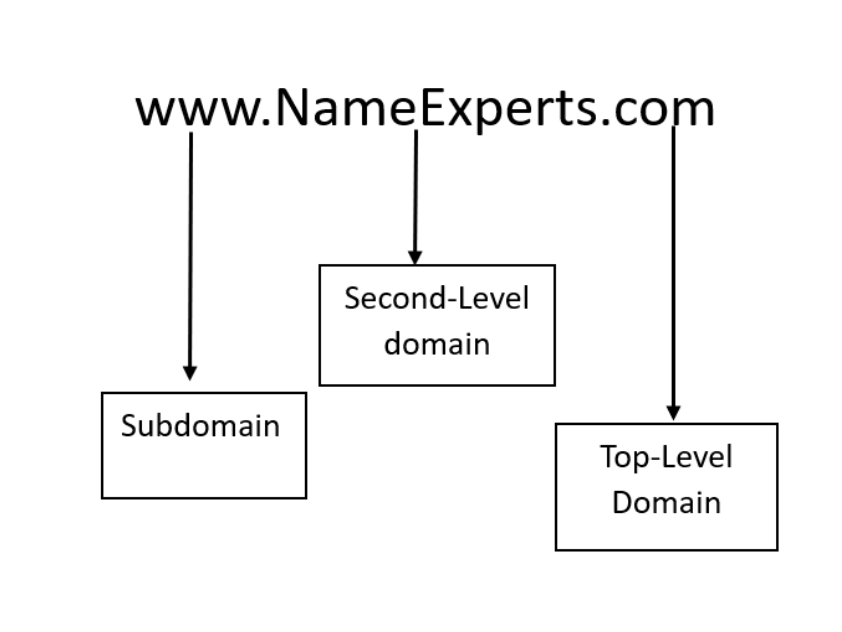
Graphic explanation showing the components of the nameexperts.com domain name

1. Top-Level Domain

The top-level domain (TLD) is the last segment of text in a domain name. The most popular TLDs you should be familiar with include

  • .com
  • .net
  • .co
  • .edu
  • .org

Yet, there are over 1,500 TLDs you can choose from. A lot of them are assigned to specific countries, such as;

  • .uk (United Kingdom)
  • .tv (Tuvalu)
  • .br (Brazil)
  • .ca (Canada)
  • .cn (China)
  • .de (Germany)

There are many other random TLDs such as .website, .book., .dog, .attorney, and .band. A popular one today is the .ai domain name, which has been a hit with tech companies.

2. Second-level domain (SLD)

This is the middle part of the domain name. It is a unique word or phrase identifying the website you want to visit. This part of the domain plays the biggest role in branding an online business. It’s also important in search engine rankings.

3. Subdomain

A subdomain is the part that comes before the main domain. They are attached to the main domain and separated by a period, e.g., blog.example.com, support.website.com.

Subdomains function like independent websites but are attached to the main site. For instance, you can have an online store or a blog attached to your main business site.


Who Manages the Domain Name System (DNS)

The Internet Corporation for Assigned Names and Numbers (ICANN) is the agency responsible for managing the global domain name system. It is a nonprofit organization that enacts policies for creating and managing domain names. It permits companies called domain registrars to sell domain names on its behalf.

Technically, you don’t own any domain that you use. You’re leasing it from ICANN (via your domain registrar) and controlling it as long as you renew the registration. If your registration expires, another person can take control of the domain – although with a little effort it’s possible to secure a domain name forever (sort of).


How To Buy A Domain Name

To buy a domain, you can head to any domain registrar’s website and check if someone else has not registered the domain name you want. If so, you can immediately pay for it and start using it.

If the domain name you want has already been registered, don’t fret. You can hire a domain name broker to help you trace, contact the owner, and negotiate a possible purchase. Domain brokers have experience arranging domain sales, so they’ll help you pay a fair price for the domain you want.


Tips For Choosing A Domain Name

  • It should be short and simple. Longer domain names are more difficult to remember. Try and choose a strong domain name that will match your business goals and ambitions.
  • Avoid using hyphens and numbers in the domain name.
  • Use keywords related to your line of business. This helps improve your branding and search rankings.
  • A .com TLD should be your first option. If that isn’t available, use other popular TLDs such as .co and .net. The more popular the TLD is, the easier it will be to promote.
Google search box to denote the importance of a domain name


Frequently Asked Questions about Domains

How long can I register a domain name for?

The maximum registration period for a domain name is 10 years. But you can renew it every 10 years and keep control of the domain.

What is a premium domain name?

They are high-quality domains that people often buy to flip for a higher price later. Demand for premium domains is high, and the price increases over time, making them good investments.

Can you sell your domain name?

Yes, you can sell your domain name anytime you want to. You can do that yourself or enlist a domain broker to find a buyer for the best price.

How do you find the owner of a domain?

You can identify a domain’s owner by querying the public WHOIS database, which contains contact information about the registered owner of every domain.

What happens if I don’t renew my domain name?

Registrars usually give a 30-day grace period in which you can reclaim the domain. Your domain will be auctioned on the market if that period runs out.


About the author

Joe Uddeme is Director and Principal of Name Experts, one of the world’s leading domain name brokerage services. He has overseen domain name sales and acquisitions totaling more than $150 million and is renowned worldwide as a go-to expert in buying and selling premium domains. Contact us at: [email protected]

Subscribe for More Domain Buying & Selling Advice

Related posts

Default alt text
Startup Domain Names: Buying the Right Domain Name

Choosing a brand name for your startup? Need a great domain name to match? NameExperts.com Director Joe Uddeme shares his top tips.   Having the right domain name for your startup sounds like common sense. However, it can be a challenging endeavor. Your organization’s name might not translate into a good domain name. Or maybe everything suitable appears to have been taken. Regardless of the challenges, it is absolutely essential that you have a fantastic domain name so customers can find you. It can also help increase brand awareness and the long-term success of your business. So how can you actually buy a good domain for your startup? Let’s investigate. Key Takeaways The power of brainstorming The golden rules of a great startup domain name Do your research Consider alternate endings (TLDs)   Brainstorm Your Startup Domain Name When acquiring a domain, you need to start by doing some brainstorming. Consider: What’s the name of your business? What services or products are you selling? What industry are you involved in? Develop five terms or phrases which can best answer those questions and can describe the domain name that you’d wish to acquire. For instance, if you wanted a domain name that involved “advertising,” you could use related terms like “online marketing,” “digital marketing,” “advertising,” or “sales marketing” as a starting point. While this may sound obvious, you also need to remember that your domain name ought to be related to your organization. For example, if your company name is Joe’s Electronics then you would want a domain name to reflect that name. If the website was called joesawesomewebsite.com, clients would not know that it was really an electronics site, which means you’re losing out on business because customers can’t find you.   Keep Your Domain Name Brief, Unique and Easy to Remember While brainstorming domains, you also wish to bear in mind that the shorter the better. Shorter domain names aren’t just easy to type, but also easier to remember. If you heard the domain from a friend or on the radio, would you be able to spell it correctly? Try and settle on a domain that’s unique. The last thing that you need is for your domain to get confused with another site. This will also ensure you won’t encounter any ownership issues.   Research your Startup Domain Name Now that you’ve found a domain that fits your brand, you need to be 100 percent sure it is available. One option would be to explore checkdomain.com, Domjax or copyright.gov. The best-known names are usually .com domain names – these are widely accepted. It also means that they are likely to have a premium cost to them if you are looking to purchase them. Check the whois information on the domain you are trying to buy, or reach out to a seasoned domain name broker who will have years of experience in sourcing owners and negotiating deals.   Add Modest Words Before or After Your Domain While you should keep away from pluralizing or hyphenating words, as that will create confusion (“best” or “top” are also a little overused, too), there could be some minor alterations to make your domain stand out. Let’s say you have a car rental business located in Phoenix. You could search for a domain name that was on the line of phoenixrentals.com.   Use Other Domain Extensions/Endings Ideally, you would like to secure a .com domain. It’s the best option for branding and type-in-traffic, which is essential for any site. However, there are other endings or extensions (TLDs) that could benefit your brand as well. Take the .info extension for example. It could be an alternative if you are running an informational site. Another choice is to localize your own domain. If your site is based out of the United Kingdom, you would want to utilize the .uk or co.uk extension. Not only does this open the door to additional possibilities, it differentiates you from an international website. A website like name.com is an excellent resource for searching for domains and extensions.   View Auctions for Domain Names You can also hit auctions to purchase a domain name which was/is previously owned. There are numerous sites that have been acquired by investors as a means to monetize a site. They will purchase a domain and fill the website with lists and links to other sites simply for lead generation.   Contact A Domain Broker There are instances when somebody had a domain and did not do anything with it – or the business didn’t work out and the domain name has expired. In cases like this, the domain name is now available for purchase. If your preferred domain is not up for auction, you could work with a domain name expert or broker to contact the current owner. If you decide to go it alone, make sure you gather any information that can assist you in ultimately determining if this is the right asset for your brand. If the owner is considering selling the domain, you’ll want to do a little investigating to learn how much it’s worth. Our domain broker services can complete a professional domain name appraisal to determine how much traffic is visiting the website. It may not be the only element in determining the site’s value, but it’s a powerful indicator. Another thing we’ll look at is sale prices of comparable doman names. Some great names, such as Cars.com, have gone for astronomical sums.   About the author Joe Uddeme is Director and Principal of Name Experts, one of the world’s leading domain name brokerage services. He has overseen domain name sales and acquisitions totaling more than $150 million and is renowned worldwide as a go-to expert in buying and selling premium domains. Contact us at: [email protected]

A man and a woman in office worker attire sit side-by-side looking at a computer screen (unseen) to denote a conversation about what happens about buying a domain name
What To Do After Buying a Domain Name

Congratulations! You bought a domain name. But now what? In this post, domain name expert Joe Uddeme explains what to do next to keep your domain name protected – and extract its full value.   “I have a domain name. Now what?” – this is a very common question people ask. The fact is, a domain name is pointless if you don’t do anything with it! After buying a domain, many things will run through your mind, and choosing how to use it productively can be confusing. However, don’t fret. This article will guide you on what to do after purchasing a domain name. Do it right, and you can leverage your domain name and build it into an attractive asset. Do it wrong, and you’ll waste 20 bucks on the temporary ownership of something you can’t even touch.   Key takeaways: What is web hosting and why do you need it? Building a website and a brand you can leverage Attracting online customers to your new business Planning your exit strategy Before we proceed, let’s run through how to buy a domain in the first place.   Acquiring Your Domain Buying a domain has become more simple than ever. In 2025, it’s just a few clicks and a swift online transaction. The first step is to choose a domain name you like that is relevant to your business. Afterwards, you can check if it’s available to buy immediately. Find a domain registrar accredited by the Internet Corporation for Assigned Names and Numbers (ICANN), the organization overseeing all domain names on the Internet. If the domain name is available, you can purchase it immediately from an accredited registrar. The price depends on how high the demand for the domain name is. If the domain name has already been claimed, you need a different approach. You can check domain marketplaces to see if the owner has possibly listed the domain for sale (see our list of the best domain marketplaces). Otherwise, you can possibly contact the owner to negotiate a deal. If this is out of your comfort zone and you have a high-value premium domain name in your sights, check out an experienced domain name broker with a great track record. For more details on securing a domain name, check our in-depth article about how to buy a domain name. What To Do After Buying A Domain Name You have acquired a domain name and have taken the first step in building your web presence. There are many other things to do after buying the domain, and we’ll outline them below. 1. Get Web Hosting Setup After buying a domain name, the first thing to consider is hosting a website with it. You’ll need a web hosting package from a reliable company. The company will host your website on its servers for a fee, and your website will be accessible once someone types your domain name into their web browser. Web hosting has become a walk in the park, at least in terms of getting started. You can get reliable web hosting for a few dollars monthly, and the price keeps going down as computing capacity increases around the globe. Sometimes, a domain registrar also offers web hosting services, meaning you can buy a domain name and a hosting package from the same platform. Otherwise, you can buy them separately and point your domain name to your hosting company’s servers. 2. Connect Your Domain to Your Hosting Connecting your domain to your hosting provider is relatively easy. You can do it via two methods: Changing the nameservers to those of your web hosting provider. Adding a DNS A record. Either method involves changing the domain name system (DNS) configurations from your domain registrar. Your registrar allows you to directly change the nameservers from its default to the one provided by your hosting company. You can also point your domain to the hosting company’s nameservers by adding a DNS A record. It’s the same action but with two different approaches. 3. Create an Email Address with Your New Domain Instead of using a common email address ending with “Gmail.com,” “Yahoo.com,” or “AOL.com,” you can use one ending with your custom domain name. It makes you look more professional and shows people you’re serious about your business. Many domain registrars also offer email hosting, so you can pay for it and create custom emails directly. Otherwise, you can choose an external email provider and change your domain’s DNS MX records to point to its mail servers. 4. Build Your Website and Brand The best way to put a domain to work is to create a website with it. It can be any type of website, such as a blog or online store. Creating a website is usually complex, but there are ready-made tools that make the process as easy as it can get. You can use a designated website builder like WordPress, Wix, Weebly, Squarespace, etc. WordPress is the most common tool for building websites because of its versatility. You can use it to create virtually any type of website you want. Follow these steps: Install WordPress on your web hosting account (many hosting providers offer one-click WordPress installation). Afterwards, log into your WordPress dashboard to begin customizing your website.

Woman faces the camera while sitting in front of a laptop for blog post about domain names
How to Rebrand Your Business and Domain Name

Even well-established businesses sometimes need to rebrand, and one of the biggest issues can be finding a new domain name to match. In this post, NameExperts.com Director Joe Uddeme looks at the smart way to do it.   Looking to rebrand your business? It’s rarely a walk in the park, with a to-do list that features everything from registering your new name, changing all of your company materials, and, crucially, securing a new domain name that can help your rebranded business to grow. There’s often a significant culture change, too, and it’s important your staff understand why you’re rebranding and what your hopes are for the new-look company. In this post, we’ll look at some key things to consider, including buying the domain name you’ll need. Key Takeaways The compelling reasons behind rebranding Considerations for your audience/marketplace Publicizing your new brand Practical considerations (logos, etc.)   How to rebrand a business Branding is a critical consideration for every business. Branding refers to promoting your products with a distinctive feel and design. It’s an ideal way to differentiate yourself from competitors. No matter how good your products are, you won’t sell them without proper branding and customer awareness. Branding isn’t an easy task. We wouldn’t have many companies struggling to sell themselves if it was. The world is littered with failed branding strategies, even from big brands. Netflix’s struggled early on to use Qwikster to break out its DVD rental service and its streaming service. However, a failed branding strategy isn’t the end of the world. Any business can rebrand and make it right with consumers. Netflix didn’t give up when its Qwikster brand failed. It continued DVD rentals with its usual name (successfully) before pivoting to video streaming later. When your initial branding strategy doesn’t work, the intelligent thing to do is a rebrand, and there are specific factors to consider when doing that. Be clear on what’s driving the rebrand Before initiating rebranding efforts, you must be clear on what’s driving the need for the rebranding. There are varying reasons for a business to rebrand, and each demands different strategies. The most common reasons for rebranding include: Having an outdated brand To reposition your brand Reputation management Brands can become outdated when they fail to keep up with rapid changes in modern style and influence. For example, a social media site from the early internet days won’t survive well in this current internet age when we have vastly different demographics. The early social media platforms became outdated over time, and those that failed to rebrand lost market share. You can also rebrand to reposition your company’s business strategy. If your original name focused on a niche, but has evolved to target a broader offering. FilterEasy to Second Nature is a good example of a brand that changed brand names to better align with their new offering. They originally focused on selling only filters but evolved to sell home care products. Check out our story about the rebranding of Monday.com for another great case study. Businesses also rebrand for reputational purposes. You may have started with a well-meaning name that unfortunately became associated with negative things in the future. A typical example is a Chinese fashion retailer named ISIS that had to rebrand when the name became associated with terrorist activities.   Focus on the Core Messaging Your rebrand should have clear and concise messaging. You should be able to tell a story with your new brand that customers can relate to. Just don’t rebrand without context – because that can irk existing customers. Let them know why you’re rebranding and why it’s better for the business. A simple explanation goes a long way in making your customers empathize with you despite the short-term inconvenience. Let your teams know this, too.   Consider your audience, market, and competition Take time to evaluate how your rebranding would affect your existing audience (customers) and standing against competitors in the market. Ensure you research to validate if your rebranding reasons are appropriate. How would your customers react to an unfamiliar brand name? Is there intense brand competition in your industry? These are good questions to ask before initiating any rebrand. You must be sure that the direction of your rebrand matches what customers want. There are two main types of branding research: quantitative and qualitative. Quantitative research entails collecting and analyzing numerical data to find patterns, while qualitative implies using non-numerical data. Focus groups are a good example.   Publicize your new brand Your rebranding efforts will be futile if you don’t make customers aware of it. Consumers have short attention spans, meaning they can easily forget your old brand. Once you rebrand, assume you’re a newly formed brand and market like one. Buy ads on social media platforms, search engines, TV, etc., to spread the word about your new identity.   How do I rebrand an existing business? 1. Buy a new domain name In this digital age, not having a website puts you on a lower level than your competitors. Hence, the first step to rebranding an existing business is securing the proper domain name. Before choosing your new brand name, check if a corresponding domain name is available. Your domain name is how customers would find you, so you can’t afford to make errors here. You can buy any available domain name through any domain registrar. However, there are cases where a domain you want is already taken, and you see yourself having no other choice. Don’t fret. You can enlist a domain name broker to find and contact the owner with an offer on your behalf. Domain brokerage services are great at negotiation and can take care of the technical side of domain name acquisition, too. 2. Change your logo A logo is an essential aspect of any brand because it’s one of the first things a customer recognizes and identifies with. Hence, you should change your logo during rebranding to signal your new brand identity. You can make your logo simpler for customers. Likewise, you can use unique colors to make your new brand stand out from your former. 3. Change your slogan Many brands have a slogan that customers resonate with, e.g., Nike’s “Just do it” and Disneyland’s “The happiest place on earth.” It would be best if you changed your slogan when rebranding to flaunt your new brand identity. 4. Create new ads You should create advertisements fitting your new brand identity. Your ads will now use a different slogan, color palette, keywords, etc.   What does it mean to rebrand a business? Rebranding is the process of changing an organization’s corporate image. It entails creating a new look and feel for an existing company to influence customer choices. A rebranding company would typically change its name (and domain), logo, slogan, vision, mission statement, etc.   Why would a company rebrand? There are various reasons why a company would rebrand. It could be repositioning themselves for a new business strategy, reputational management, or simply fixing an outdated brand. If a company is switching from a niche market to a larger one, it’s wise to rebrand appropriately to match its new focus. Likewise, if a company’s brand suffers from a poor reputation due to internal or external causes, a rebrand can help avert it.   Should you rebrand your business? Rebranding is a complex and expensive undertaking that you must do only with a clear goal. If you’re not looking to change your strategy, avert a reputational crisis, or face other standard issues that call for rebranding, we advise you to avoid it. However, in the right circumstances, it can give a struggling company or one with immediate challenges a new lease of life.   About the author Joe Uddeme is Director and Principal of Name Experts, one of the world’s leading domain name brokerage services. He has overseen domain name sales and acquisitions totaling more than $150 million and is renowned worldwide as a go-to expert in buying and selling premium domains. Joe has helped with the rebranding of numerous large companies. Contact him at: [email protected]    

Why Work with Name Experts

Name Experts offers personalized domain brokerage services, assisting clients in buying or selling premium domain names with expert appraisal, negotiation, and complete transaction management while ensuring confidentiality.

Some of our most
successful stealth acquisition and sales

Aid.com

Fit.com

Mine.com

GLD.com

Jeff.com

Fora.com

Nori.com

Secure.com

Guitar.com

F*ck.com

Radian.com

MetaData.com

Prize.com

Link.com

Loop.com

Programs.com

Claim.com

Quince.com

Hook.com

QXO.com

NQ.com

Rest.com

Humani.com

Max.com

Need help buying or selling premium domains?