
April 18, 2022

How We Helped Air Filtration Specialists Second Nature to Rebrand With a Premium Domain Name

written by

Joe Uddeme

Joe Uddeme

How We Helped Air Filtration Specialists Second Nature to Rebrand With a Premium Domain Name

When a business is stuck with a legacy name that no longer works, rebranding is often the only solution. But securing the domain name that goes with your new moniker is rarely easy – unless you have a premium domain name broker on your side.


You may have heard of Second Nature, an air filtration subscription business based in Raleigh, North Carolina. Second Nature sells high-quality home air filters on a subscription basis, letting people access clean air conveniently.

However, the company didn’t start with its current name. It was previously known as FilterEasy before rebranding in 2019.

Rebranding from FilterEasy to Second Nature reflected the company’s decision to become an all-encompassing “home wellness” brand instead of limiting itself just to filters.

It was a sound decision that made the company more attractive to customers and investors.

FilterEasy was a referral from one of our trusted partners to help identify the owner and secure the SecondNature.com domain name. They were budget-conscious and looked for a way to buy the domain name without investing all the capital on day one.

They were looking for a domain broker or consultant that could help assign value to the asset, and also protect the anonymity of the FilterEasy team.

Second Nature is an ideal case study of how proper rebranding can boost a company’s fortunes. It’s something you can draw a lot of lessons from.


Starting out – new insight about air filters

FilterEasy began in 2012 as the brainchild of two students from the North Carolina State University (NCSU). Kevin Barry and Thad Tarkington sought to help people access residential air filters conveniently. Their idea was to sell home air filters on a recurring subscription basis so that customers could change them regularly.

Often, homeowners buy air filters and forget to change them at the recommended time. An unchanged air filter usually clogs up, and debris passes through, causing adverse effects. Hence, subscriptions represented an excellent reminder for customers to change their filters.

FilterEasy passed through a local startup accelerator program and launched out of beta in 2014. It began by offering air filters in over three dozen sizes. Barely a year after its launch, it had amassed 10,000+ subscribers and grossed $1 million in annual recurring revenue, representing major success.
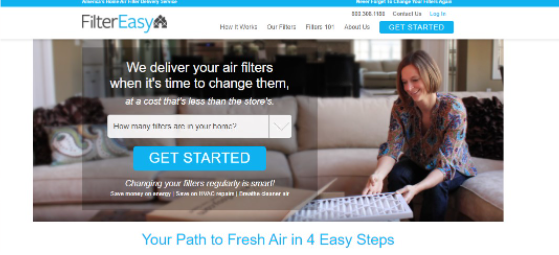
FilterEasy was a simple idea implemented remarkably. All it did was add the subscription touch to air filter procurement, and it turns out a lot of customers liked that option. In 2015, the company raised $1.2 million in seed funding to expand its business.

Scaling – taking the product to the masses

After raising its seed round, FilterEasy was heading to higher heights. The company began spending significantly on marketing to spread the word to customers. It wasn’t enough to have a good product; people had to know about it.

FilterEasy invested in TV and social media ads to help market its brand and did so successfully. Another exciting marketing strategy the company undertook was partnerships with property management companies. Customers may not be convinced by TV or social media ads but pay much attention to the companies managing their rental properties. FilterEasy partnered with such companies to help spread the word to residents. One example is Ultimate Property Management, a North Carolina-based property management firm.

Ultimate Property Management teamed up with FilterEasy to create custom air filter solutions for their residents. The firm negotiated the exact quantity and size of filters required for a single change and ensured they were delivered to tenants on schedule. Likewise, the air filter packages included personalized messages with instructions on how to change filters.

Ultimate Property Management ultimately found out that tenants were keen to change their air filters when they arrived at their residents’ doorsteps. For the ones that didn’t, it sent email notifications to remind them. It was evident that FilterEasy had solved a significant pain point for residents with a simple idea.

FilterEasy raised subsequent funding rounds following its 2015 seed round. In 2016, the startup closed a $4.5 million Series A round from a group of VCs, including Fidelis Capital, IDEA Fund Partners, and Azure Capital Partners.

In 2017, FilterEasy closed a $6.9 million Series B round led by Arsenal Venture Partners. The company showed outstanding growth; its revenue rose 300% from 2016 to 2017, so it wasn’t surprising that investors broadly opened their checkbooks.

FilterEasy deployed its funding to grow its business. Driving the growth was a strategic manufacturing partnership with AAF Flanders, America’s largest residential HVAC filter manufacturer. FilterEasy never had to worry about inventory because AAF Flanders always supplied on time.

Rebranding – and securing the right domain name

FilterEasy rebranded as Second Nature in 2019, a time of rapid growth. The company didn’t want to be known only for filters, so it took on a more generic name. Nature represents the phenomena of the physical world, including the air we breathe in. Second Nature bodes well with home wellness and general sustainable green living.

FilterEasy officially rebranded as Second Nature in August 2019, changing its domain name from FilterEasy.com to SecondNature.com.

The company purchased the new domain officially on the 19th of July, 2019.
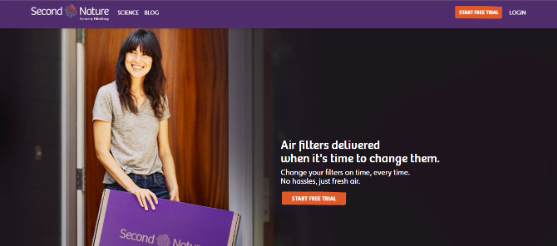
It is much more difficult for an online business to rebrand than a physical one. A physical store could change its name but remain at its exact physical location, so customers always know where to find it. On the flip side, a domain name is the only way to find an online store. If the name doesn’t register in customers’ minds, they won’t locate the online store.

The same year it rebranded, Second Nature added a water filtration product to its lineup. Customers could now order water filtration systems as they did with air filters and have them replaced periodically. Likewise, property managers could also subscribe on their tenants’ behalf.

In March 2020, Second Nature closed a $16.4 million Series C round from a group of new and existing investors. MANN+HUMMEL, a German manufacturer of air and water filtration systems, was a strategic investor in the round.

Second Nature had over a hundred thousand subscribers at its Series C round, compared to around ten thousand five years earlier. The 100,000+ subscribers brought in a steady bit of recurring revenue to power up the company’s business. The company had expanded from about a dozen employees to 150 in five years.

In 2020, Second Nature also got a business boost from the Covid pandemic. The company started selling face masks made with air filter technology. Public health agencies, such as America’s Centers for Disease Control and Prevention (CDC), advised people to use air filters and face masks to reduce the risk of contracting the virus. Second Nature provided these two things and earned significant revenue as demand exploded.

Rebranding as Second Nature was an intelligent move. Instead of limiting itself to filters, the company has positioned itself as an all-encompassing “home wellness” and sustainability brand. With the new name, the company would have no problem expanding its product line outside filters.

Lessons learned

Choosing the right name is critical in every business. Second Nature might not be as successful as it is right now if it had picked the wrong name. Its current name fits greatly with the air filter business and is easy for customers to remember.

Also, don’t be afraid to rebrand when you have the resources. The Second Nature domain name may have been too expensive for two college students, so they started with something more feasible. However, as the business expanded, the co-founders garnered enough resources to rebrand, and they did that successfully.

Ensure you market your company effectively after rebranding. Second Nature advertised heavily after its rebrand to make existing customers aware. It also took advantage of its new generic name to reach more customers.

The efforts paid off in the long run. Second Nature is now a well-known company pulling in tens of millions of dollars annually.

We like to reference this case study as it is a fantastic example of how we are able to secure seemingly out-of-reach domain names for our clients (and at the right price). It also helps highlight just how important it is to choose a great brand name. Whatever your naming conundrum, give us a call. We’ve “achieved the impossible” for everyone from Mark Cuban to Monday.com – and can do it for you, too.


About the author

Joe Uddeme is Director and Principal of Name Experts, one of the world’s leading domain name brokerage services. He has overseen domain name sales and acquisitions totaling more than $150 million and is renowned worldwide as a go-to expert in buying and selling premium domains. Contact us at: [email protected]

Subscribe for More Domain Buying & Selling Advice

Related posts

Professional looking man (on right) and woman (on left) studying computer as if in conversation about domain names
The 3 Types of Domain Names and Common Domain Extensions

When you buy a domain name, you purchase a piece of digital real estate. But what, exactly, are you getting for your money? NameExperts.com Director Joe Uddeme unravels the elements of a domain name – so you’ll have a clearer understanding of the architecture behind them.   A domain name is an address you type into your web browser whenever you want to visit a website. It is arguably one of the most important assets any business can own. While ‘domain name’ is an all-encompassing term, a domain is actually made up of multiple parts. Understanding these elements can give you a clearer picture of the domain name investing world and ensure you’re well-informed before buying a domain name or asking a skilled domain broker to negotiate the purchase of one on your behalf. Key Takeaways Domain names – an introduction The 3 types of domain name Domain TLDs for beginners Why not check out our article about why choosing a .com domain name still makes sense for most businesses? What are domains? A domain name is a human-readable address that directs you to a particular website available on the internet. It’s akin to the address for your official residence or workplace. When someone wants to visit you, they come to your address. Similarly, when someone wants to visit a website, they type in the domain address in their web browser. Any domain name has four main components; Domain name: The name of the domain itself. Top-Level domain (TLD): The suffix that appears after the domain name, e.g., .COM and .NET. Subdomain: A domain that is part of another primary domain. It is also known as a third-level domain. Protocol: The system that specifies how information from the domain is transferred to your web browser. It is either HTTP (insecure) or HTTPS (secure). Take https://www.nameexperts.com/, for example. NameExperts is the domain name .COM is the top-level domain WWW is the subdomain HTTPS is the protocol The 3 Types of Domain Names There are three main types of domains, including: 1. Top-Level Domains A top-level domain (TLD) is the final section of a domain name. It is the last segment of text appearing after the dot symbol. For example, in Google.com, .COM is the top-level domain. Ever since the world wide web’s inception, .COM has been the most common top-level domain. It was originally used to designate commercial businesses but has become the de-facto TLD for most websites. Another popular TLD is .NET. It was initially meant for internet service providers and networks but is now available to anyone who wants it. Because NET signifies network and technology, this is an ideal option for technology companies. Yet another well-known TLD is .ORG, which was originally used to designate not-for-profit organizations. Till today, most people associate this TLD with non-profit organizations and social causes rather than commercial businesses. The .ai TLD is another popular one today – especially for tech firms. There are two main types of top-level domains; Generic TLD A generic top-level domain refers to domain name endings with three or more characters, the type that you’d most likely recognize. .COM, .NET, .ORG, .INFO, and other common domain endings fall under this category. Before 2011, there were barely two dozen domain extensions classified as generic. That year, the Internet Corporation for Assigned Names and Numbers (ICANN) expanded the number of generic domain extensions from 22 to over 1,200, opening up more opportunities for individuals and businesses to acquire domain names. Country-Code TLD As the name implies, these are domain extensions associated with specific countries. ICANN assigns country domain endings to each formally recognized nation and sovereign state, and these nations collect a royalty on every sale of their assigned TLD. For example, Tuvalu, a small island nation, earns 1/12th of its annual income from its .TV domain extension. Other popular examples of country domain endings include .US for the United States of America .AU for Australia .DE for Germany .CA for Canada .CC for Cocos Islands .AE for the United Arab Emirates (UAE), etc. 2. Second-Level Domains A second-level domain is directly below a top-level domain in the domain hierarchy. It is the part of the domain name that comes right before the top-level domain. For example, in NameExperts.com, NameExperts is the second-level domain. The second-level domain is usually a combination of words describing the business or service of the domain name owner – and it pays to match this to the name of your business whenever possible to strengthen your brand. In the above example, NameExperts describes the business of a professional domain name broker that helps customers to acquire valuable domains. A second-level domain can include letters, numbers, and hyphens. Symbols are not allowed. 3. Third-Level Domains The third-level domain, or subdomain, is the part of the URL that comes before the second-level domain. The most common subdomain is www., which refers to the world wide web. Third-level domains are not mandatory, so you can have a fully functional domain name without the www part. Some website owners create third-level domains to represent a different section of their website. Examples include: Shop.mywebsite.com refers to the e-commerce section of a website. Blog.mywebsite.com refers to a blog attached to the website. Support.mywebsite.com leads to the customer support section of a website. Understanding Domain TLDs A domain name is the most important property for anyone who conducts business online. Hence, it’s crucial to understand what they are and the different types of domain name extensions to use for a website. The information above should help you figure out how to structure your domain, but if you need help, we’re experts at domain selection and helping you buy the perfect domain.     About the author Joe Uddeme is Director and Principal of Name Experts, one of the world’s leading domain name brokerage services. He has overseen domain name sales and acquisitions totaling more than $150 million and is renowned worldwide as a go-to expert in buying and selling premium domains. Contact the NameExperts team at: [email protected]

Image looking over a person's shoulder to indicate anonymity when securing a domain name
Domain Privacy and Protection: How and Why to Hide WHOIS Information

If you don’t tread carefully, anyone in the world can find out who bought the web address you just snapped up. Domain name expert Joe Uddeme shares his top tips for staying out of the limelight.   In the rush of excitement that comes with securing a name – especially a desirable, premium domain name you’ve been after – it’s easy to overlook one of the most basic elements of name registration: shielding your identity. Millions of people before you have forgotten to do it – precisely because it is so easy to overlook. Or perhaps you spotted the option to stay anonymous but didn’t quite understand what it meant – or felt it wasn’t worth the cost. Here’s how to stay out of the WHOIS database when buying a domain name – and why you might want to. Key takeaways: Understanding your Domain Privacy options Discover which countries keep your name secret by default The benefits of keeping your information private How to ensure your name stays out of the picture Discover Domain Privacy FAQs   What Is Domain Privacy? Domain privacy is a service domain registrars offer customers to hide their information from the public WHOIS database. Customers pay for privacy from their registrar, which replaces their contact information in the WHOIS database with a forwarding address.   What Does Domain Privacy and Protection Do? It removes a domain owner’s information from the public WHOIS database and preserves their privacy. The WHOIS database is a vast database operated by the Internet Corporation for Assigned Names and Numbers (ICANN). ICANN is the agency that oversees domain names, and every individual or company that buys a domain name must provide their contact information to this agency. ICANN, in turn, lists all contact information in a public database called WHOIS. Anyone can search the WHOIS database to get the contact information of a domain’s owner. Many owners are uncomfortable with their contact information being listed publicly, so they pay their domain registrars for domain privacy and protection. The registrar replaces the customer’s contact information with a forwarding or proxy address on the WHOIS database, so people can’t look up the real contact details.   Do I Need Domain Privacy? You need to pay for privacy protection if you’re uncomfortable with your email address or phone number being posted online. Many spammers and telemarketers scour the WHOIS database for the contact information of domain owners to sell them products. Domain name privacy protection prevents this from happening. People residing within the European Union (EU) don’t need to pay for domain privacy because they get it by default. On 25 May 2018, the EU passed the General Data Protection Regulation (GDPR) ruling. This ruling mandated companies serving EU residents to give customers control over their data. EU customers were granted strict data privacy under this law, so domain registrars began hiding their information from the WHOIS database by default. Many other countries have passed laws similar to GDPR, such as Turkey, South Korea, Argentina, and Brazil. The United Kingdom (UK), a former EU member, also passed a similar law. You may not need to purchase a domain name private registration if you reside in these countries. However, customers in other countries need domain privacy and protection to hide their contact information.   How Important Is Domain Protection? It is important because it lets you hide your contact information from the public view. Without this protection, your personal information will be available to anyone who wishes to find it, and malicious actors may take advantage of this freedom to target you with cyberattacks and domain name scams.   Benefits Of Privacy Protection 1. Protects Personal Information Buying privacy protection when registering a domain removes your personal information from the public eye. People won’t be able to find your contact information by looking up your domain name on the WHOIS database. Instead, they’ll see the contact information of your domain registrar, which they can’t trace back to you. 2. Minimizes and Prevents Spam Spam is the biggest problem on the internet. It refers to any irrelevant and solicited message sent over the internet, usually to advertise products or steal information via phishing. Spammers search every possible medium to harvest emails and phone numbers, including the WHOIS database. Domain protection hides your details from this database so spammers can not target you with unsolicited messages. 3. Anonymity Many people are uncomfortable with their personal information being on the internet for whatever reason. Domain privacy and protection grants you anonymity even when you control many domain names. 4. Prevents Competitive Data Mining Businesses often mine public databases for information about their competitors. For example, if you run a popular blog anonymously, rival blogs may want to discover your identity and research potentially damaging information about you. Domain privacy and protection ensures that competitors can’t trace your identity through your domain name. 5. Prevents Domain Theft Hackers often target owners of valuable domain names with phishing messages to steal their registrar login details. They do this by sending a link to a website that looks exactly like your domain registrar’s page but is actually a different web address. The end game is to log into the owner’s registrar with the stolen details and transfer their domain name to another account. Purchasing domain privacy means that hackers won’t find your contact information in the first place. You can hold onto your valuable domain names without fear of being targeted by sophisticated cybercriminals. (Check out our post about what to do if you lose your domain name). How To Get Domain Privacy And Protection When Buying a Domain Most registrars display the option to add privacy protection to your cart when you choose to buy a domain name. It’s an effective method of upselling because they know many customers want privacy. Look for “hide WHOIS information,” “domain privacy,” “domain protection,” or a similar phrase on the domain registration box and select it. Head to the checkout page and pay for the registration, privacy protection, and any other item you selected. After paying, you’ll automatically have WHOIS protection for your new domain. Add To An Existing Domain You can always buy privacy protection for a domain name you already own. Follow these steps; Log into your domain registrar account. Head to the domain management section. Click on the specific domain name you need privacy for. Open the Security tab, and you’ll likely find a button that prompts you to buy WHOIS protection. Click on the button and proceed to your checkout page to pay. Wait for some time after the payment confirmation for your registrar to update the WHOIS database information. There are dozens of domain registrars, and the steps to add privacy protection to an existing domain are similar to what we explained above for each of them.   FAQs on Domain Privacy Should I add privacy protection when buying and selling domains? Yes, you should add the option to hide domain registration info because it has many benefits. It prevents spam, competitive data mining, and potential domain theft. It also guarantees anonymity on the WHOIS database, which is desirable for privacy-conscious customers. If you are working with multiple domain names, especially high-value ones, an experienced domain consultant can ensure all of this is taken care of on your behalf. How Do You Buy A Domain With Privacy Protection You’ll usually see an option to buy privacy protection on the page where you search for an available domain. Add the privacy protection item to your cart alongside the domain name and pay, and you have successfully acquired privacy protection for your new domain. Is privacy protection available on all domains? It’s available for most domains, but there are some exceptions due to government rules. These include .US., .CA, and .FR, among others. Is there a cost to domain privacy and protection? Most registrars charge between $10 and $20 annually for privacy protection while registering a domain. However, a few offer it for free, e.g., NameCheap.   About the author Joe Uddeme is Director and Principal of Name Experts, one of the world’s leading domain name brokerage services. He has overseen domain name sales and acquisitions totaling more than $150 million and is renowned worldwide as a go-to expert in buying and selling premium domains. Need help? Contact us at: [email protected]

Close up of man's hand pointing at a laptop keyboard, as if checking how to buy/sell a doman name online
How to Buy a Taken Domain Name

Got a business idea? All set to buy a domain name so you can start dominating online? Some domains are readily available – others, less so. Here is our step-by-step guide to buying your dream domain name.   Option 1: buy a domain name from a domain registrar Choose a Domain Name: Perform a domain name search. Pick a name that represents your business or personal brand. Keep it short, memorable, and easy to spell. Choose the appropriate domain extension (e.g., .com, .net, .org). Check Availability: Use a domain registrar (like GoDaddy, Namecheap, Google Domains) to check if your desired website name is available. Select a Domain Registrar Compare prices and services from domain registrars. Understand how domain locks and transfer processes work, and familiarize yourself with renewal costs and web hosting services. Most domain registrars offer promotions of a free domain name with a year renewal to register a domain name. A few providers include: GoDaddy- web hosting company, domain name registrar and marketplace offering many domain extensions to find your desired domain. Namecheap- domain name registrar and marketplace, offering whois database search and domain name registration to register a domain name. Bluehost- web hosting service and domain registrar. Google Domains- no longer operational after signing a deal with Squarespace. Register the Domain Once you’ve chosen a domain name registrar, follow these steps: Create an Account: 1. Sign up with the domain name registrar. Do your research and pick one whose services you like. 2. Add to Cart Select your desired web address and add it to your cart. 3. Domain Name Registration Process: Decide how long you want to hold the domain registration. (typically 1-10 years). Auto-renewal is another option to own the asset indefinitely. Choose your domain name registrars wisely! 4. Enable Domain Privacy Protection (optional): This hides your contact details from public records for added privacy protection. 5. Make Sure Domain is Locked: To avoid unauthorized use or theft, make sure the domain is locked in the current registrar. 6. Pay for the Domain extensions Enter your payment details and complete the purchase for your desired domain name registration. 7. Set Up Your Website’s domain Connect the unique domain to a website or email service, or hold onto it for future use or domain name trading to the highest bidder. That’s it! You now own the domain name as long as you continue to pay the yearly renewal costs within the registration period. Keep domain privacy enabled when registering a new domain. Option 2: Buy a domain name with a broker Find a Broker: Choose a domain broker service. Submit a Request: Provide the domain name you want to acquire and your budget. Broker Negotiation: The broker contacts the current domain owner and negotiates on your behalf. Agreement: Once a price is agreed upon, the broker secures the domain. Transaction: Complete payment through the broker’s secure system. Transfer: The domain is transferred to your account. This simplifies the process by letting the broker handle negotiations and logistics on your behalf. The broker can typically save you money with their expert negotiation tactics and industry-wide relationships. They can also provide the necessary domain name contract. From a marketing perspective, having the right domain is especially importan; you don’t want to settle for an unworthy alternative. Maybe you’ve already tried to find decent alternatives, but they’re not really the ones you want. Or, you have thought about using a different TLD (Top-Level Domain). While that is a feasible option, it can also confuse potential website visitors who might try to visit the .com when you own the .net version of a domain. Don’t give up just yet! You might be able to buy your ideal domain name directly from its current owner. Here’s how the process works for buying a domain name that is already taken. How To Buy A Domain Name That is Taken At Name Experts, we deal with buying and selling domain names on a regular basis and have helped many clients buy their ideal domain. We help you understand how to buy a domain name and the process to secure your perfect brand. Here is the 6-step process we follow when someone is interested in buying a domain name that is owned by someone else: Evaluate your internet domain name Find out who owns the domain Target the right contact person Determine your spending limit Negotiate without emotional attachment Transfer ownership of the domain 1. Evaluating Your Preferred Domain Name We know that a lot of work goes into finding the right domain name. The first step is to think about your long-term goals for your company, and make sure that your desired domain is a good fit for your business and what you intend to do with it. Once you’re sure that the domain you want is a good fit, you’ll need to evaluate the website currently on the domain. Is there a real working website there? Has it been updated recently? If it is, then most likely the owner won’t be interested in selling. However, if it’s really outdated or is just a placeholder website, then you can approach the owner with the confidence that you might be able to make a deal. Sometimes, owners of certain domains are just waiting for the right buyer to come their way and make an offer. Investigating the domain is crucial in making sure it is available and allows you to determine if buying a domain that is already owned by someone else is a realistic option. 2. Find Out Who Owns The Domain Once you decide that the domain name you’re after is the one you want, the next step is to find out who owns it. There are a number of different websites that can look up that information for you and the most common method is a Whois lookup. Entering your desired domain into one of the whois search sites will return information about that domain, including when the domain was registered, who registered it, and the contact information for the person or company that currently owns the domain. Unfortunately, accessibility to domain owners has really taken a hit with GDPR and some registrars offer advanced privacy protection services for free when you register a domain name. By adding more privacy to comply with GDPR regulations and additional measures to hide contact information, it can make it difficult for some folks to reach the rightful domain owners. If you are able to determine the domain owner’s contact information through the Whois lookup you can continue working through the next steps. But what if you can’t? It’s time to hire a broker. In a few seconds, they can help find an available domain name. 3. Target the Right Contact Person In some cases, the Whois lookup is just the start of the process. Some domain owners are very large, corporate power-houses that own hundreds or perhaps thousands of domain names and the contact information shown may not lead you to the correct person. Amazon.com is a perfect example. They own more than 41,152 domain names in their portfolio. Many of their domains go unused. How do you find the person involved with domain portfolio management, much less the domain you’re interested in, within Amazon’s 600,000+ employees? Did you Reach the Proper Decision Maker? Is it the project manager around that brand? Would it be marketing, CMO, Legal, Business Development, Webmaster, Technology etc? It’s a vital step to connect with the correct person or division within the company so you don’t spend time spinning your wheels. This is where working with a domain broker can be beneficial. They can do the research to identify the owner of the domain and establish contact for no additional fee. Depending on the extension you want, you may find the perfect domain name that works for your business. After contact is established, you need to determine whether the asset is indeed available for purchase – and if it is, will it be within your budget (and if not, can domain name price negotiations bring it down to an acceptable level)? 4. Determine Your Spending Limit Before you even start the negotiation process after you’ve found the owner, you want to think about the budget you have in mind. Make sure you think about what the owner went through, too. If they are actively using the domain to promote their business and have spent their time and money building a website, then you’ll want to make them a fair offer that reflects the domain’s value. If you partner with a domain broker, they can tell you what the domain is actually worth. They’ll conduct a valuation of the domain and can provide you with their estimate of a fair price. You can then use that to make a great offer that will simplify the negotiation process and hopefully get you closer to the outcome you desire for your business identity. 5. Negotiate Without Emotional Attachment Whatever you do next, don’t become emotionally attached to the asset when you start negotiating a price for the domain name. Ultimately, this could add headache, stress and more money to the equation if you start making decisions based on emotion. Remember that a negotiation is a give-and-take and should always try to create a win/win for both buyer and seller. If the price isn’t right and goes beyond your budget, you should be willing to walk away. Once you agree on terms, in most instances you would then either enter into a contract or purchase and sales agreement with the prospective seller or simply move right to one of the formidable escrow providers such as Escrow.com. Contracts and documents can become tricky and need to be completed diligently and professionally if necessary. You will also need to have proper legal representation to make sure you are protected accordingly. Documents can get stuck in legal or need board approval, and can certainly slow down the overall acquisition process. 6. Transfer Ownership of the Domain So now you have made proper contact, negotiated a price, handled the paperwork and set up the Escrow transaction. The buyer has agreed to terms and now you are ready to transfer the domain name. Domain transfers can sometimes be tricky but typically follow two forms for completion. The easiest way to transfer a domain name is by “pushing” the domain name within the current registrar. Alternatively, you may also choose to transfer your domain name to another registrar. To complete this, you will need an authorization code from the seller. Make sure the domain name is unlocked and privacy removed before you try and transfer the domain name. Once the transfer has been completed, you can release the funds to the seller and mark the transaction complete. The entire process for a domain name transaction can be completed in as short as 3-5 days, however most transactions take longer. Some transactions take months to come to fruition, but when complete you will have successfully purchased a domain name that was owned by someone else. What To Do if You Can’t Find the Domain Owner? If the Whois lookup doesn’t provide the contact information you need, it does not mean your path to purchasing the domain ends. Instead, reach out to a domain broker to continue the research process. They can conduct additional investigations into who owns a domain – or at least begin to track down contacts who can get them closer to finding that information. Partnering with a broker at this phase of the process is a great step to take as everything that follows can be challenging to do on your own. Not only is it time-consuming, but they’re experts at this and spend every day figuring out how to help people find their perfect domain.   Getting Support in Buying A Domain Name That is Already Taken Working with successful brokers can save you a lot of time, money, and hassle when it comes to getting the domain name you want. Reach out to us, and let us help you grow your business. We’d love to answer any questions about our services and help boost your confidence when it comes to buying and selling domains. 7 key reasons why you should buy a domain name: 1. Professionalism and Credibility Owning a custom domain (e.g., yourbusiness.com) makes your business look more professional and credible compared to using free services like yourbusiness.wordpress.com or Gmail addresses. 2. Brand Control A domain name helps establish and protect your brand identity. It ensures your business name is uniquely represented online and prevents others from using it. 3. Easy Online Access A custom domain makes it easier for customers to find your website, improving your online visibility and brand recognition so consumers can find your site properly. 4. Custom Email Addresses A domain allows you to create personalized, professional email addresses (e.g., [email protected]) that look more professional than generic ones. 5. SEO Benefits Having a relevant domain name can improve your search engine rankings, making it easier for potential customers to discover your website through organic search. What makes a ‘relevant’ domain? Check out our post about why a .com domain name is still king. 6. Long-Term Investment A domain name is a valuable digital asset that can appreciate over time, especially if it’s a premium or in-demand name. 7. Security Owning your domain means you have full control over your online presence and don’t rely on third-party platforms that could change policies or shut down. Buying a domain helps you establish a unique and trusted online presence, improve credibility, and create opportunities for future growth.   About the author Joe Uddeme is Director and Principal of Name Experts, one of the world’s leading domain name brokerage services. He has overseen domain name sales and acquisitions totaling more than $150 million and is renowned worldwide as a go-to expert in buying and selling premium domains. Using his years of experience, negotiation skills and little black book of contacts, Joe is an expert at helping clients secure .com domain names that are already owned. Contact him at: [email protected]  

Why Work with Name Experts

Name Experts offers personalized domain brokerage services, assisting clients in buying or selling premium domain names with expert appraisal, negotiation, and complete transaction management while ensuring confidentiality.

Some of our most
successful stealth acquisition and sales

Aid.com

Fit.com

Mine.com

GLD.com

Jeff.com

Fora.com

Nori.com

Secure.com

Guitar.com

F*ck.com

Radian.com

MetaData.com

Prize.com

Link.com

Loop.com

Programs.com

Claim.com

Quince.com

Hook.com

QXO.com

NQ.com

Rest.com

Humani.com

Max.com

Need help buying or selling premium domains?