

Key Takeaways
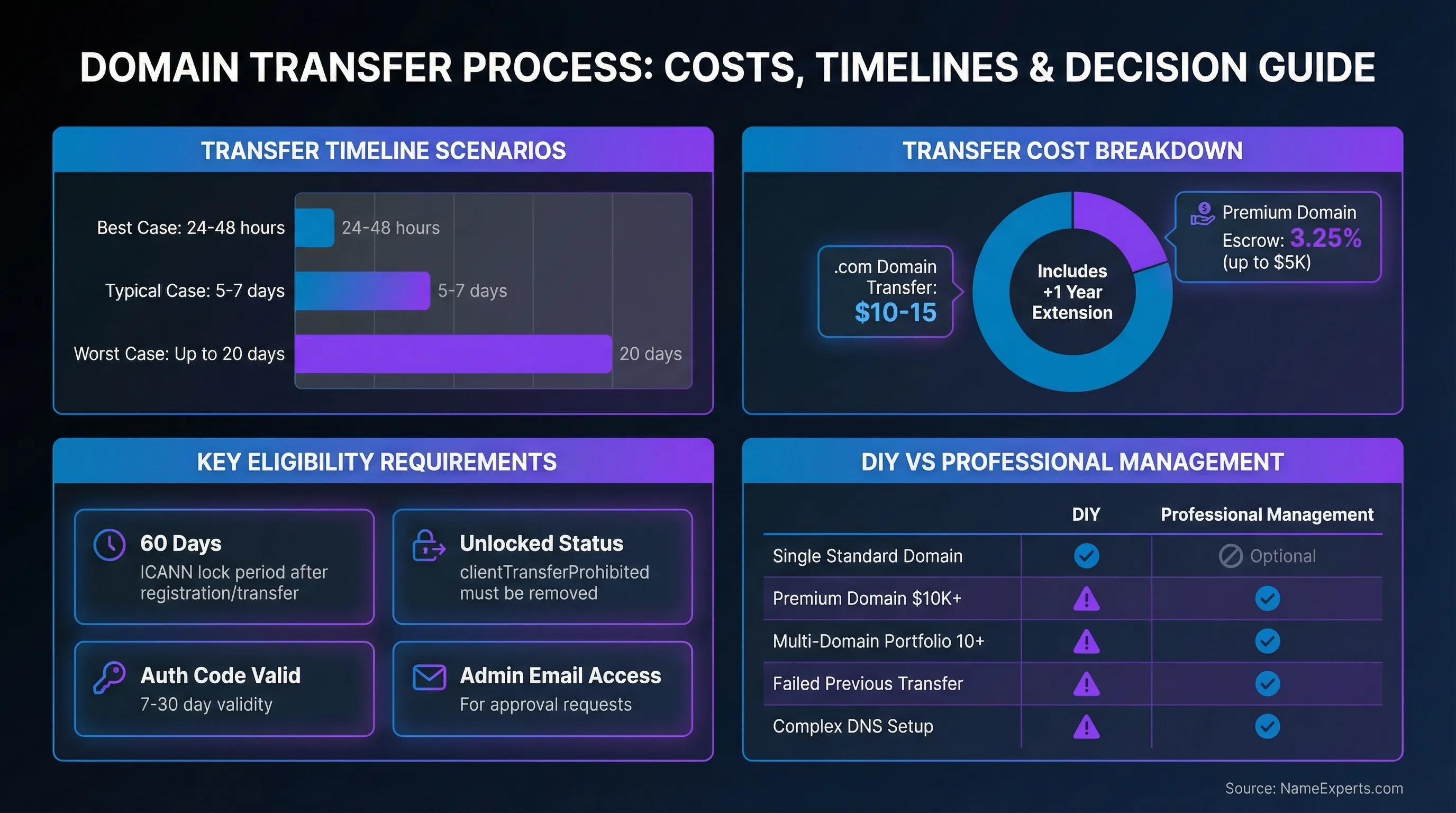
- Transfers typically take 5-7 days but can extend to 20 days depending on approval timing and registrar responsiveness
- ICANN's 60-day transfer lock applies after new registration or previous transfer (proposed changes to reduce this to 30 days have not yet been implemented as of 2026)
- You'll need three essentials: unlocked domain, authorization code (EPP), and valid admin contact email
- Transfer costs include a fee plus 1-year registration extension, typically $10-15 for .com domains
- Professional transfer management makes sense for premium domains, multi-domain portfolios, failed transfers, or complex DNS configurations
Transferring a domain doesn't have to feel like navigating the Wild West of the domain marketplace. Whether you're consolidating domains under one registrar, seeking better pricing, or accessing superior management tools, understanding the universal steps and potential complications helps you complete the process smoothly. Most transfers follow a predictable 5-7 day timeline, though registrar-specific quirks and approval delays can extend this to 20 days.
The Universal Domain Transfer Process
While registrars implement their own interfaces and workflows, the fundamental steps remain consistent across providers. Following this sequence systematically prevents common failures and keeps your move on track.

Step 1: Verify Eligibility & Prepare Your Domain
Before initiating a transfer, confirm your domain meets eligibility requirements. ICANN has proposed changes to the Transfer Policy that would reduce lock periods from 60 days to 30 days (720 hours), but these changes have not yet been implemented as of 2026. Current ICANN policy still requires 60-day restrictions for new registrations and inter-registrar transfers. Check these critical factors:
- Domain has been registered or transferred more than 60 days ago (ICANN requirement)
- Domain is not in redemption, expired, or hold status
- Admin contact email is current and accessible—all approval requests go here
- Domain privacy may need temporary deactivation (registrar-dependent)
Verify your admin contact information before proceeding. If you need to update contact details, be aware that changes to registrant name, organization, or email address trigger an automatic 60-day transfer lock for security purposes. Some registrars offer opt-out provisions, but this protection exists to prevent unauthorized transfers. If moving your domain is your primary goal, complete the process before updating contact information.
Step 2: Unlock Your Domain & Obtain Authorization Code
Domains are locked by default to prevent unauthorized modifications. This security feature, indicated by a "clientTransferProhibited" status in EPP status codes, must be removed before you can proceed. Access your current registrar's dashboard and locate the domain lock toggle—most registrars provide a straightforward unlock option in domain settings.
After unlocking, request your authorization code (also called EPP code, auth code, or transfer key). This unique code authenticates your request and typically remains valid for 7-30 days. Your registrar must provide the code within five calendar days of your request. Codes are usually delivered via email or displayed in your account dashboard.
For premium domain acquisitions, NameExperts handles all authorization code coordination with sellers, eliminating back-and-forth delays that can jeopardize high-value transactions. Our 16+ years managing complex transfers means we know how to navigate unresponsive sellers and expedite code retrieval.
Step 3: Initiate Transfer at New Registrar
With your authorization code in hand, create an account with your chosen registrar if you don't already have one. Navigate to their transfer tool and enter your domain name and authorization code. You'll pay the fee at this stage, which includes a mandatory 1-year registration extension added to your current expiration date (not replacing it).
Fees vary by top-level domain (TLD), with .com domains typically costing $10-15. This fee covers both the process and the additional registration year. Your existing registration time is preserved—if your domain expires in eight months, the move adds twelve months to that date, giving you twenty months total.
Step 4: Approve Transfer Request
Within 2-4 hours of initiating the move, expect an approval email sent to your admin contact address. This email contains a confirmation link that expedites the process significantly. Clicking to approve can reduce time from 5-7 days to 24-48 hours.
Your losing registrar may send a separate confirmation email. They can either expedite the move or, in some cases, deny it based on valid reasons outlined in ICANN policy. If you don't respond to approval requests, most registrars auto-approve after five days, allowing the process to proceed automatically.
Step 5: Verify Completion & Update DNS Settings
Once the process completes, log into your new registrar account and verify the domain appears in your dashboard. Check that DNS records transferred correctly or recreate them if necessary. Not all registrars automatically migrate custom DNS records, so having a backup of your DNS configuration prevents service disruptions.
Test your website and email functionality immediately after completion. Verify that all subdomains, email routing (MX records), and third-party integrations function properly. Re-enable domain privacy protection and auto-renewal settings as desired—these often reset during the process.
Common Transfer Problems & Solutions
Even straightforward moves encounter obstacles. Understanding common failure points and their resolutions helps you troubleshoot effectively and avoid extended delays.
Transfer Denied or Failed
The most common denial reasons include domain lock status, invalid authorization codes, 60-day restrictions, and expired domains. Check your status in your gaining registrar's dashboard—they typically provide specific denial reasons.
Registrars can only deny under limited circumstances defined by ICANN policy: evidence of fraud, reasonable dispute over authorization identity, outstanding payment for previous registration periods, express written objection from the domain holder, domain lock status, or domains within 60 days of initial registration or previous move. If your request was denied for reasons outside these parameters, you can file a formal complaint with ICANN.
Lost or Invalid Authorization Codes
Authorization codes can be regenerated multiple times if lost or expired. Contact your current registrar's support team to request a new code—they're required to provide it within five days. If your losing registrar is unresponsive or refuses to provide the code without valid reason, this constitutes a policy violation you can report to ICANN.
For premium domain transactions, sellers sometimes provide expired or incorrect codes, particularly if significant time passes between negotiation and completion. NameExperts coordinates directly with both parties to ensure codes remain valid and the process proceeds without authorization delays.
DNS and Email Downtime
DNS records don't automatically transfer with all registrars. Some providers migrate your DNS configuration, while others require manual recreation. This discrepancy causes the most common post-transfer service disruptions—websites go offline or email stops flowing.
Prevent downtime by using third-party DNS providers (like your hosting provider's DNS) before initiating the move. Alternatively, export your complete DNS record set from your current registrar and have it ready to recreate immediately after completion. Pay special attention to MX records for email hosting—these must be recreated precisely to maintain email service.
Extended Transfer Timelines
While 5-7 days is typical, some moves stretch to 20 days due to approval timeouts or registrar processing delays. You can expedite by immediately approving the confirmation email from your gaining registrar and contacting your losing registrar to request early release.
When moving multi-domain portfolios or time-sensitive premium domains, NameExperts coordinates with both registrars to expedite approvals and prevent DNS disruptions that could cost you traffic and revenue. Our established registrar relationships often enable faster processing than individual account holders can achieve.
Transferring a Premium Domain? Don't Risk Your Investment
High-value domain acquisitions require escrow coordination, seller negotiation, and precise timing to prevent authorization code expirations and payment disputes. With 16+ years managing complex transfers for brands like HBO, Monday.com, and HubSpot, we eliminate the risks that jeopardize premium transactions.
DIY vs. Professional Transfer Management
Not every move requires professional assistance, but certain scenarios benefit significantly from expert coordination. This comparison helps you determine the right approach for your situation.
| Transfer Scenario | DIY Transfer | Professional Management (NameExperts) |
|---|---|---|
| Single standard domain (.com, .net) | ✓ Recommended - straightforward process | Optional - if time-constrained |
| Premium domain purchase ($10K+) | ⚠ Risk of seller complications, no escrow coordination | ✓ Recommended - includes escrow coordination, seller negotiation, secure transfer |
| Multi-domain portfolio (10+ domains) | ⚠ Time-intensive, risk of missing approvals | ✓ Recommended - bulk coordination, unified timeline |
| Failed previous transfer attempt | ⚠ May repeat same errors | ✓ Recommended - troubleshooting expertise, registrar relationships |
| Complex DNS setup (email, subdomains, CDN) | ⚠ Risk of service disruption | ✓ Recommended - DNS migration planning, zero-downtime transfers |
| Domain in dispute or legal complexity | ✗ Not recommended | ✓ Required - UDRP expertise, dispute resolution coordination |
Understanding Transfer Costs & Timelines
Expenses extend beyond the basic registration fee. Understanding the complete cost structure and realistic timeline expectations helps you budget appropriately and plan around potential delays.
What You'll Pay
Fees vary by TLD, with .com domains typically costing $10-15 including the mandatory 1-year registration extension. This extension adds to your current expiration date rather than replacing it, so you never lose registration time by moving your domain.
Watch for uncommon "losing fees" some registrars charge when domains move away—while rare, these fees can add $10-20 to your cost. Review your current registrar's policy before initiating the process to identify any unexpected charges.
Premium domain transfers requiring escrow typically add 3-5 days to the timeline and incur escrow fees starting at 3.25% for transactions up to $5,000, decreasing for higher-value deals. These fees, based on standard escrow.com domain transfer protocols, protect both buyer and seller during high-value transactions. NameExperts manages escrow.com coordination and expedites release once funds clear, ensuring your high-value acquisition completes smoothly without payment disputes or hijacking attempts.
Realistic Timeline Expectations
Duration depends heavily on how quickly you and your registrars respond to approval requests:
- Best case: 24-48 hours with immediate approval from both parties
- Typical case: 5-7 days with standard processing and approval timing
- Worst case: Up to 20 days if approval requests time out without response
Certain TLDs follow different processes. For example, .uk domains use an IPS tag system rather than authorization codes, completing transfers almost instantly once the tag is updated. Country-code domains often have registry-specific requirements that extend or shorten standard timelines.
Premium & Complex Transfer Scenarios
High-value acquisitions and portfolio transfers introduce complications that standard single-domain moves don't encounter. These scenarios benefit most from professional management.
Premium Domain Transfers (High-Value Acquisitions)
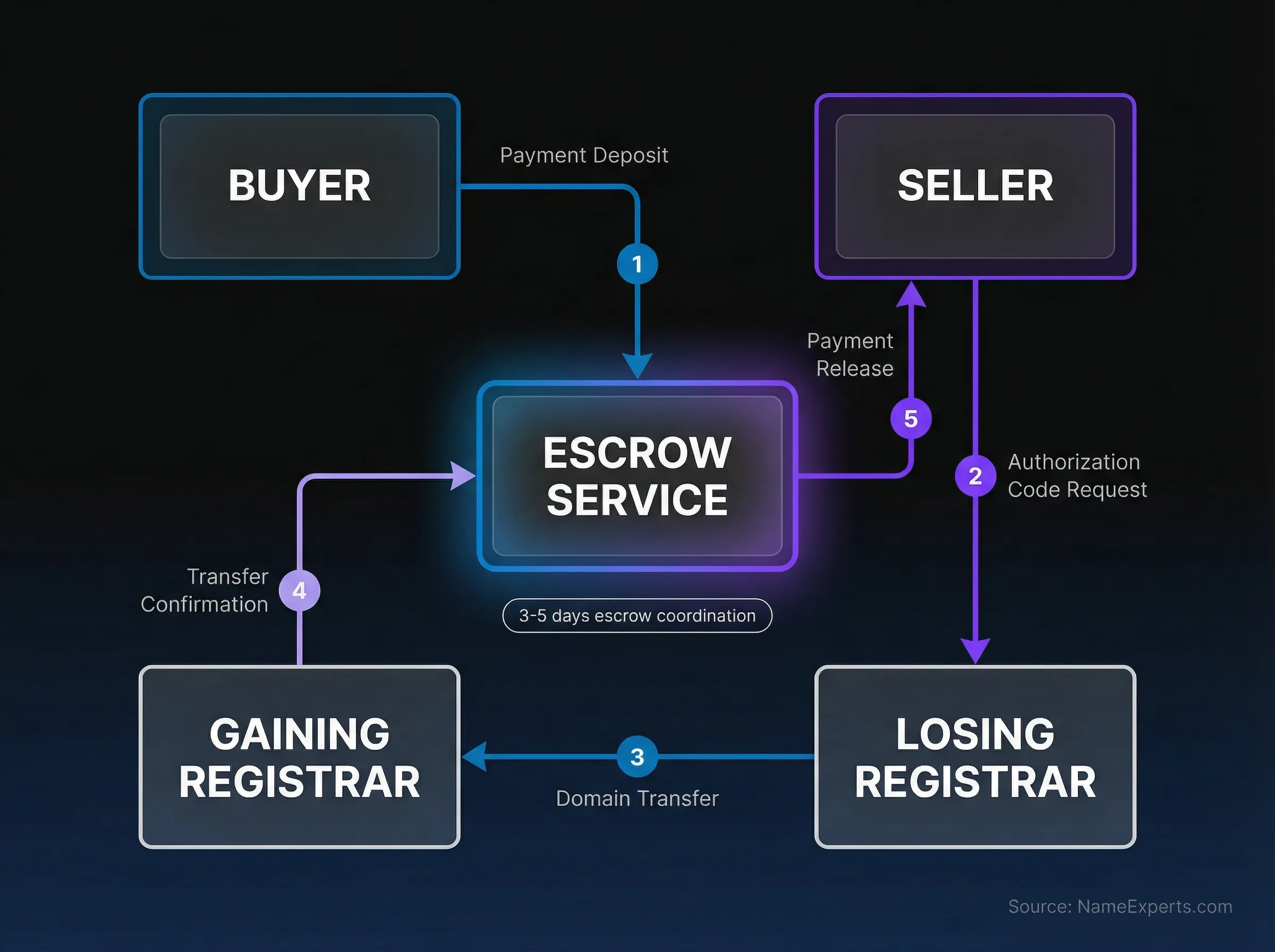
Premium domains—typically valued at $10,000 or more—require escrow services to protect both parties from fraud. The escrow process adds complexity: buyers deposit funds with the escrow service, sellers provide authorization codes and initiate the move, and the escrow service releases payment only after confirming successful completion.
Timing coordination becomes critical. Authorization codes expire, sellers become unresponsive, and delays can jeopardize entire transactions. According to domain fraud prevention data, business buyers face significant risks in premium domain transactions, with unauthorized transfers and payment fraud being primary attack vectors.
Professional brokers coordinate three-party exchanges (buyer, seller, escrow) to ensure authorization codes remain valid, moves initiate promptly after payment clears, and both parties fulfill their obligations. NameExperts has facilitated transfers for major brands including HBO/Max.com, Monday.com, TripAdvisor, and HubSpot, bringing 200+ transactions of experience to high-stakes domain acquisitions.
Multi-Domain Portfolio Transfers
Moving 10+ domains simultaneously introduces logistical challenges: managing multiple authorization codes, tracking numerous approval emails, and coordinating staggered completion dates. Many registrars offer bulk discounts of 10-30% for six or more domains, making consolidation financially attractive.
The decision between simultaneous and staggered moves depends on your risk tolerance. Simultaneous completion happens faster but risks widespread disruption if DNS migration fails. Staggered moves allow you to test the process with one domain before committing your entire portfolio, though they require more ongoing management.
Professional management provides unified coordination across all domains, ensuring consistent DNS migration, tracking all approval deadlines, and preventing the common scenario where 90% of domains move successfully but critical domains fail due to missed approvals or expired authorization codes. Our domain portfolio management services help maximize the value of your digital assets while ensuring smooth transfers.
When Transfers Fail: Recovery Strategies
If your move fails or stalls, several escalation paths exist. First, contact your gaining registrar's support team—they can often identify specific blockages and coordinate with the losing registrar to resolve them.
For persistent issues, ICANN's Transfer Dispute Resolution Policy provides formal complaint mechanisms. You can file a complaint if your losing registrar denies your request for reasons outside ICANN's permitted denial circumstances.
Premium domain moves face unique failure risks when sellers become unresponsive after receiving payment but before providing valid authorization codes. Escrow services protect against outright fraud, but they don't resolve seller non-cooperation. Professional brokers leverage registrar relationships and legal resources to compel unresponsive sellers to complete the process, protecting your investment when DIY approaches reach dead ends.
Worried About DNS Downtime and Service Disruptions?
Not all registrars automatically migrate DNS records, and recreating complex configurations incorrectly can take your website and email offline. Our team handles complete DNS migration planning and coordination to ensure zero-downtime transfers for your business-critical domains.
Ensuring Smooth Transfers
Successful moves require attention to timing, communication, and technical details. Start by confirming your admin contact email is current and accessible—this single factor prevents more failures than any other. Maintain access to this email throughout the process, as both registrars send time-sensitive approval requests here.
Document your current DNS configuration before initiating the move. Export all records or take screenshots of your DNS settings, paying special attention to MX records for email, SPF/DKIM records for email authentication, and any third-party service integrations. This backup ensures you can quickly restore service if records don't migrate automatically.
For business-critical domains, consider scheduling moves during low-traffic periods to minimize the impact of potential disruptions. While properly executed transfers shouldn't cause downtime, having technical resources available to troubleshoot DNS issues provides additional security.
When moving premium domains or portfolios, professional management from NameExperts eliminates the risk of costly mistakes. Our team handles authorization code coordination, domain name escrow management, DNS migration planning, and registrar communication, ensuring your valuable digital assets move securely without service interruptions. Contact us at nameexperts.com/contact to discuss your needs, or explore our domain appraisal services if you're acquiring premium domains and need accurate valuation before committing to high-value purchases.
Work With a Domain Expert
Whether you're acquiring a premium domain, consolidating a multi-domain portfolio, or recovering from a failed transfer, the Wild West of the domain marketplace doesn't have to be navigated alone. NameExperts brings 16+ years of experience and 200+ successful transactions to eliminate the risks of authorization delays, DNS disruptions, and unresponsive sellers that jeopardize valuable digital assets. Our no-bullshit approach means transparent coordination, direct access to principal broker Joe U
Get Started Free







Frequently Asked Questions
Transfers typically complete in 5-7 days with standard processing, though immediate approval of confirmation emails can reduce this to 24-48 hours, while delayed responses may extend the timeline to 20 days.
Your website should remain online during the transfer process itself, but downtime can occur if DNS records don't migrate automatically and aren't recreated promptly at your new registrar—backing up your DNS configuration before initiating prevents service disruptions.
Yes, ICANN's current policy requires a 60-day waiting period after initial registration or a previous inter-registrar transfer before you can move your domain again, though proposed changes to reduce this to 30 days have not yet been implemented as of 2026.
The process is straightforward for standard domains—unlock it, obtain your authorization code, initiate at your new registrar, and approve the confirmation email—though premium acquisitions, multi-domain portfolios, and complex DNS setups benefit from professional management to avoid costly mistakes.