
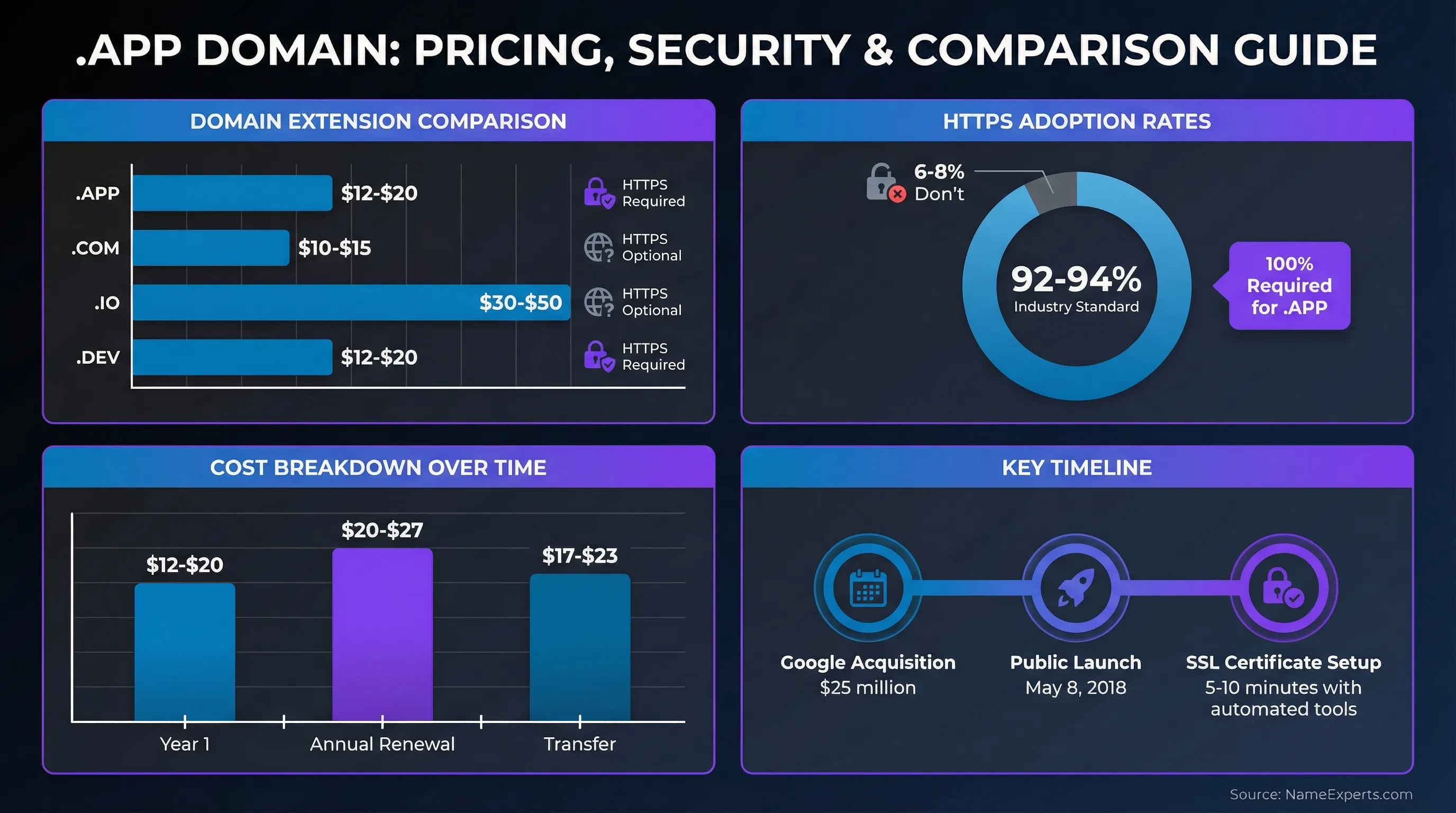
The .APP domain extension is a top-level domain (TLD) specifically designed for mobile apps, web applications, and developers. Launched by Google Registry in May 2018 after a $25 million acquisition, this extension offers a secure, memorable namespace for anyone building or promoting applications. Unlike traditional domains, every .APP site requires HTTPS encryption by default, making it the first secure-only open TLD available to the public.
Key Takeaways
- .APP domains require HTTPS encryption for all websites, providing built-in security without additional configuration
- The extension is ideal for mobile apps, web apps, PWAs, developer portfolios, and app-related businesses
- Registration typically costs $12-$20 for the first year, with renewals around $20-$27 annually
- All major browsers enforce HTTPS requirements through HSTS preloading, ensuring consistent security across platforms
What is a .APP Domain?
A .APP domain is a generic top-level domain operated by Google Registry, designed specifically for application developers and app-related businesses. The extension was made available to the public on May 8, 2018, following Google's successful bid in an ICANN auction where they paid $25 million to secure the rights.
The primary purpose is to provide a dedicated namespace for mobile applications, web applications, progressive web apps (PWAs), and developer portfolios. This creates instant recognition for visitors—when someone sees a .APP URL, they immediately understand the site relates to applications or software development.
What sets this extension apart is its mandatory security requirement. Every website using the domain must implement HTTPS encryption before it will load in modern browsers. This requirement is enforced through HSTS (HTTP Strict Transport Security) preloading, which we'll explore in detail later.

.APP vs Other Domain Extensions: Which Should You Choose?
Choosing the right domain extension depends on your specific needs, target audience, and branding strategy. Here's how the extension compares to popular alternatives:
| Extension | Best For | Security | Availability | Typical Price (First Year) | Memorability |
|---|---|---|---|---|---|
| .APP | Mobile/web apps, developers | HTTPS required (built-in) | High - newer namespace | $12-$20 | High - clear purpose |
| .COM | General business, established brands | HTTPS optional | Low - most taken | $10-$15 | Very high - universal recognition |
| .IO | Tech startups, SaaS platforms | HTTPS optional | Medium - popular with tech | $30-$50 | High - tech association |
| .DEV | Developer tools, coding resources | HTTPS required (built-in) | High - newer namespace | $12-$20 | High - developer focus |
When to choose this extension: If you're building or marketing mobile applications, web-based tools, or developer services, the domain provides immediate context. The security-first approach also appeals to users who prioritize data protection. Real-world examples include cash.app (Square's payment app), call.app (communication platform), and bear.app (note-taking application).
When alternatives make more sense: If you're building a general business website without a specific app focus, .COM may offer broader recognition. For developer tools and coding resources specifically, .DEV provides similar security benefits with a different positioning. The .IO extension remains popular for tech startups, though it lacks the mandatory HTTPS requirement.
At NameExperts, we've helped clients evaluate domain options across 200+ transactions over 16 years. Our experience shows that the right extension depends on your specific use case—there's no universal "best" choice, only the best fit for your goals.
Struggling to Find the Perfect Domain for Your App?
With over 15 years of experience navigating the digital real estate marketplace, NameExperts helps app developers and tech companies secure premium domains that align with their brand—whether it's .APP, .COM, .IO, or another extension. We'll help you evaluate your options and acquire the right domain at a fair price.
The Security Requirement: HTTPS and HSTS Explained
Every website using this extension must implement HTTPS encryption before it will function in web browsers. This requirement is enforced through a technology called HSTS (HTTP Strict Transport Security) preloading, which is built into the domain at the registry level.
HSTS preloading means the entire top-level domain is included on a list maintained by major browsers (Chrome, Firefox, Safari, Edge). When a browser encounters any URL on this list, it automatically upgrades the connection to HTTPS before making the first request. This happens even if the user types "http://" or omits the protocol entirely.
According to the HSTS preload list documentation, this approach solves a critical security problem: the "first-load vulnerability." Normally, when a user visits a site for the first time, the browser doesn't know whether HTTPS is required until after making an initial HTTP connection. This creates a window where attackers could intercept or modify traffic. Preloading eliminates this risk entirely.
The security benefits include protection from downgrade attacks (where attackers force connections back to unencrypted HTTP), prevention of content injection (where third parties insert ads or tracking code), and assurance that all data transmitted between users and your site remains encrypted.
What this means practically: Before your website will load, you'll need to obtain and configure an SSL/TLS certificate. Free options are available through services like Let's Encrypt, and many hosting providers offer one-click SSL setup. The requirement adds one extra configuration step, but it ensures your users' data stays protected from the moment your site goes live.
This mandatory security sets the extension apart from most other TLDs, where HTTPS is optional. While industry trends show 92-94% of websites now use HTTPS, the requirement ensures 100% adoption for this namespace.
How to Choose the Right Domain Name
Selecting the perfect domain name requires balancing memorability, brand alignment, and availability. Here are proven strategies for finding a name that works:
Keep it short and memorable: Shorter names are easier to type, remember, and share. Aim for 15 characters or fewer if possible. Single-word domains like "cash.app" or "call.app" provide maximum impact, though most are already registered.
Align with your brand: Your domain should clearly connect to your app name or company. If your mobile app is called "TaskMaster," then taskmaster.app creates immediate recognition. Avoid generic terms that don't differentiate your specific product.
Check availability across extensions: Before settling on a name, verify it's available not just as a .APP domain but also as .COM and other relevant extensions. This prevents brand confusion and protects against competitors. NameExperts offers domain search tools that check availability across multiple TLDs simultaneously, saving time during the research phase.
Avoid trademark conflicts: Search the USPTO trademark database and international trademark registries to ensure your chosen name doesn't infringe on existing marks. This prevents costly legal issues down the road.
Consider premium vs. standard pricing: Some domains are designated as "premium" by registrars and carry higher prices—sometimes hundreds or thousands of dollars. These are typically short, keyword-rich names. Decide whether the premium cost justifies the branding benefit for your specific situation.
Think about pronunciation and spelling: Choose names that are easy to say out loud and spell correctly. Avoid unusual spellings or numbers that create confusion when sharing verbally.
Registration Process
Registering your domain follows a straightforward process, though there are important considerations specific to this extension:
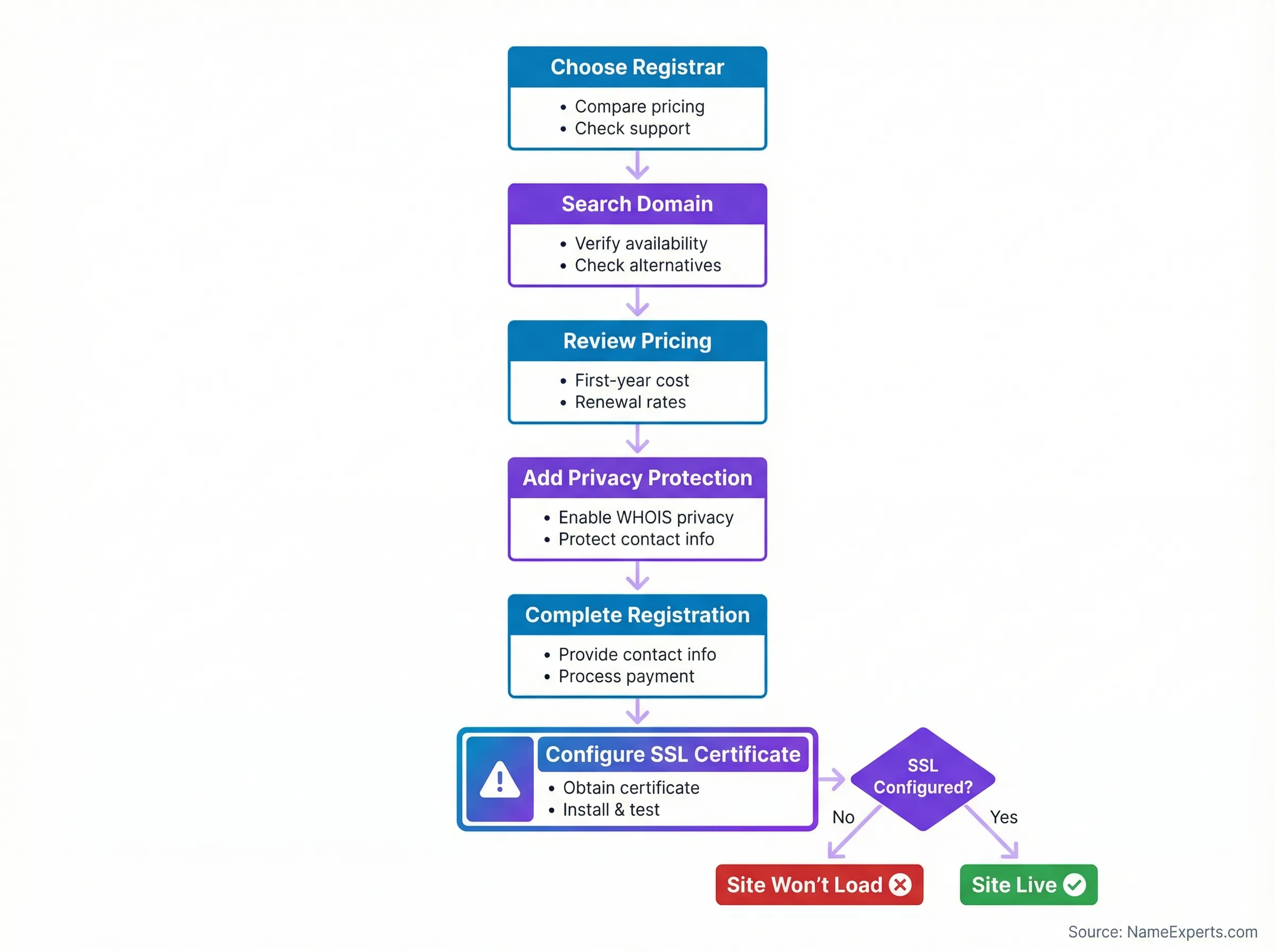
Step 1: Choose a registrar. Select a domain registrar that offers the extension. Most major registrars support it, including those that provide competitive pricing and reliable service. When evaluating registrars, consider factors like customer support quality, DNS management tools, domain privacy options, and renewal pricing transparency.
Step 2: Search and select your domain. Use the registrar's search tool to verify your desired name is available. If your first choice is taken, the search will typically suggest alternatives.
Step 3: Review pricing. Typical first-year pricing ranges from $12-$20, with renewals around $20-$27 annually. Be aware that some registrars offer promotional first-year pricing but charge higher renewal rates. NameExperts tracks real-time pricing across registrars to help identify the best value for your specific needs.
Step 4: Add domain privacy protection. Most registrars offer free WHOIS privacy protection, which shields your personal contact information from public databases. This reduces spam and protects your privacy—always enable this feature if available.
Step 5: Complete registration. Provide the required contact information and complete payment. Registration is typically instant, with your domain active within minutes.
Step 6: Configure SSL certificate. This is the critical step unique to this extension. Before your website will load in browsers, you must obtain and install an SSL/TLS certificate. Many hosting providers offer free SSL certificates through Let's Encrypt and provide automated installation. If you're using services like Google App Engine, Firebase, or Cloudflare, SSL configuration is often included automatically.
Common pitfalls to avoid: Don't register without understanding the HTTPS requirement—your site won't work until SSL is configured. Don't ignore renewal dates—set calendar reminders or enable auto-renewal to prevent accidental expiration. Don't skip domain privacy protection, as this exposes your personal information publicly. NameExperts provides comprehensive guides for evaluating registrar features and avoiding these common registration mistakes.
Moving Existing Websites to This Extension
If you're migrating an existing website to this domain, proper planning ensures you maintain search rankings and user access:
Prepare for the move: Before initiating the transfer, ensure your new domain is registered and SSL certificate is configured. Set up your hosting environment and test that the site loads correctly on the new domain.
Implement 301 redirects: Configure permanent (301) redirects from your old domain to the new one. This tells search engines that your content has permanently moved and transfers most of your SEO value to the new location.
Update Google Search Console: According to best practices for site moves, add your new domain as a property in Google Search Console and use the "Change of Address" tool to notify Google of the migration. This helps maintain your search rankings during the transition.
Update internal links: Change all internal links within your site to use the new domain. This prevents unnecessary redirects and ensures optimal site performance.
Monitor for issues: After migration, watch for broken links, missing redirects, or SSL certificate errors. Use tools like Google Search Console to identify and fix any crawl errors that appear.
Update external references: Change your domain in social media profiles, email signatures, business listings, and anywhere else your old domain appears. This ensures users find your new location and prevents confusion.
Already Found Your Ideal Domain—But It's Taken?
Most premium app domains are already registered, but that doesn't mean they're unavailable. NameExperts specializes in stealth acquisitions, negotiating on your behalf while protecting your anonymity to prevent price inflation. Our no-bullshit approach has helped clients secure their perfect domains across 200+ transactions.
Cost Considerations and Pricing
Understanding the total cost of ownership helps you budget appropriately for your domain:
Registration costs: First-year registration typically ranges from $12-$20, depending on the registrar and any promotional offers. Some registrars offer discounted first-year pricing as low as $6-$8, though renewal rates are usually higher.
Renewal pricing: Annual renewals generally cost $20-$27. This is the price you'll pay each year to maintain ownership. Always check renewal rates before registering, as some registrars advertise low first-year prices but charge significantly more for renewals.
Transfer costs: If you transfer your domain from one registrar to another, expect to pay $17-$23. Transfers typically include a one-year extension of your registration period.
SSL certificate costs: While the domain requires HTTPS, you don't necessarily need to purchase an SSL certificate. Free options through Let's Encrypt provide the same encryption as paid certificates. However, some businesses prefer paid certificates for extended validation (EV) or organization validation (OV), which can cost $50-$200 annually.
Premium domain pricing: Short, highly desirable names may be designated as premium domains with prices ranging from hundreds to thousands of dollars. Whether this investment makes sense depends on your branding strategy and budget.
Additional services: Consider costs for DNS management (usually free), email forwarding (often free), domain privacy protection (typically free), and web hosting (varies widely based on your needs).
Technical Requirements and Setup
Successfully deploying a website on this extension requires understanding several technical requirements:
HTTPS is mandatory: Your website will not load in modern browsers without a properly configured SSL/TLS certificate. This isn't optional—it's enforced at the browser level through HSTS preloading.
Obtaining an SSL certificate: Free certificates are available through Let's Encrypt, a nonprofit certificate authority. Many hosting providers offer one-click Let's Encrypt integration. Alternatively, you can purchase certificates from commercial providers, though the encryption level is identical to free options.
Configuring HTTPS: The specific configuration steps depend on your hosting environment. Cloud platforms like Google App Engine, Firebase, Cloudflare, and Netlify often provide automatic HTTPS setup. Traditional web servers like Apache or Nginx require manual certificate installation and configuration.
Avoiding mixed content errors: All resources loaded by your website—images, scripts, stylesheets, iframes—must also use HTTPS. Loading HTTP resources on an HTTPS page creates "mixed content" errors that browsers will block. Use browser developer tools to identify and fix any mixed content issues.
Development environment considerations: Even during development, use HTTPS to avoid issues when deploying to production. Tools like mkcert allow you to create locally-trusted development certificates for testing.
DNS configuration: Point your domain to your hosting provider using DNS records (typically A records for IPv4 addresses or CNAME records for hostnames). Most registrars provide DNS management interfaces, or you can use third-party DNS services like Cloudflare for additional features.
Best Practices for Success
Maximize the value of your domain by following these proven strategies:
Build a dedicated landing page: Create a professional landing page that showcases your app, provides download links, and explains key features. This gives users a trustworthy destination when they encounter your domain.
Use it for deep linking: Configure deep links that direct users to specific content within your mobile app. For example, "yourapp.app/feature" could open directly to a particular feature when clicked on a mobile device.
Maintain consistent branding: Ensure your website design matches your app's visual identity. Consistent colors, fonts, and imagery reinforce brand recognition.
Provide support resources: Use your domain to host FAQs, documentation, release notes, and contact information. This creates a central hub for user support.
Optimize for mobile: Since the extension targets app users, ensure your website is fully responsive and provides an excellent mobile experience.
Monitor security: Regularly check that your SSL certificate remains valid and hasn't expired. Set up monitoring alerts to notify you of any certificate issues before they affect users.
Track analytics: Implement analytics tools to understand how users find and interact with your site. This data helps you optimize your marketing and user acquisition strategies.
Common Questions About This Extension
Can I use it without an actual app? Yes, there are no restrictions requiring you to have a published application. However, using the extension for unrelated purposes may confuse visitors who expect app-related content. Brand relevance matters for user trust and marketing effectiveness.
Do I need to configure HTTPS before buying? No, you can register the domain before setting up HTTPS. However, your website won't load in browsers until you configure an SSL certificate. Plan to complete SSL setup before directing users to your site.
Are these domains good for SEO? The extension itself doesn't provide inherent SEO advantages over other TLDs. However, the mandatory HTTPS requirement aligns with search engine preferences for secure sites. Google has confirmed HTTPS is a ranking signal, though it's one of many factors.
Can I transfer an existing domain? Yes, you can transfer ownership from one registrar to another using the standard domain transfer process. You'll need to unlock the domain at your current registrar and obtain an authorization code (EPP code) to initiate the transfer.
What happens if I don't set up HTTPS? Your website simply won't load in modern browsers. Users will see an error message indicating the connection cannot be established. This makes SSL configuration a mandatory step, not an optional one.
Is the extension suitable for enterprise use? Absolutely. Many established companies use it for their applications, including Square (cash.app) and other major brands. The built-in security and clear branding make it appropriate for businesses of all sizes.
How long does SSL certificate setup take? With automated tools like Let's Encrypt and modern hosting platforms, SSL setup can take as little as 5-10 minutes. Manual configuration on traditional servers may take 30-60 minutes depending on your technical expertise.
Making Your Decision
The .APP domain extension offers a secure, purpose-built namespace for anyone building or promoting applications. The mandatory HTTPS requirement ensures your users' data stays protected, while the clear branding helps visitors immediately understand your site's purpose.
This extension is ideal for mobile app developers, web application companies, SaaS platforms, developer portfolios, and app-related businesses. The relatively new namespace means short, memorable names remain available—an increasingly rare advantage in the domain market.
Key considerations before registering: Ensure you're prepared to configure HTTPS (though free tools make this straightforward), verify your desired name is available, compare pricing across registrars, and confirm the extension aligns with your branding strategy.
At NameExperts, we've guided clients through domain selection for over 16 years across 200+ transactions. Our experience shows that the right domain choice depends on your specific goals, target audience, and long-term vision. Whether you choose this extension or an alternative, the most important factor is selecting a name that resonates with your users and supports your business objectives.
Ready to secure your domain? Start by checking availability for your desired name, compare pricing across registrars, and plan your SSL certificate setup. With the right preparation, you'll have a secure, memorable home for your application in minutes.
Work With a Domain Expert
Choosing the right domain extension is just the beginning. Whether you need help evaluating .APP versus other options, acquiring a premium domain that's already registered, or navigating the Wild West of the domain marketplace, NameExperts provides personalized, boutique service with direct access to 15+ years of expertise. We'll help you secure the perfect digital real estate for your app without overpaying or compromising your anonymity. Get Started Free
Get Started Free







Frequently Asked Questions
The .APP domain is a secure top-level domain operated by Google Registry specifically designed for mobile applications, web apps, and developer-related businesses, requiring mandatory HTTPS encryption for all websites.
First-year registration typically costs $12-$20, with annual renewals ranging from $20-$27 depending on your registrar, though premium names may cost significantly more.
Yes, this extension is excellent for developers and app-related businesses because it provides instant recognition of your site's purpose, built-in security through mandatory HTTPS, and good availability of short, memorable names in a newer namespace.
Choose a registrar that offers the extension, search for your desired name to verify availability, complete registration with payment and contact information, then configure an SSL certificate before your site will load in browsers.


